A late material delivery, an unplanned machine stoppage or a sales order brought forward can change a factory’s entire day. When production plans live across spreadsheets, whiteboards and separate inventory systems, teams spend valuable time chasing updates instead of making decisions. Production planning software gives production, warehouse, purchasing and finance teams one operational view of what needs to be made, what is available and what will prevent the plan from being met.
For Australian manufacturers and process-based businesses, the value is not simply a better schedule. It is the ability to commit to realistic delivery dates, control stock, manage labour and machine capacity, and understand the financial effect of production activity while work is still underway.
What production planning software should control
Production planning is the point where customer demand meets the practical limits of materials, people, machines and time. Good software turns those moving parts into a plan that operational teams can use on the floor.
At its core, the system should link sales orders and forecasts to bills of materials, recipes or routings. It should calculate the components required for each job, check available and incoming stock, and create or recommend production orders. For a garment washing operation, that may mean matching garment batches to chemical availability, wash capacity and finishing schedules. For a food processor, it may involve managing yield, expiry dates, batch traceability and packing requirements.
The plan also needs to reflect real capacity. A production order is not useful if the required machine is already committed, the skilled operator is unavailable or a downstream process has become a bottleneck. Capacity planning helps schedulers see these constraints before they become missed dispatch dates.
A connected system should also carry actual production results back into inventory and finance. When a job consumes more material than expected, produces scrap or takes additional labour hours, managers can see the variance quickly. That makes cost control an active process rather than a month-end surprise.
Why disconnected planning creates avoidable pressure
Many growing businesses start with spreadsheets because they are flexible and familiar. The issue is not that spreadsheets cannot create a schedule. The issue is that every change depends on someone updating it correctly, then passing that update to the people buying stock, allocating staff, running machines and invoicing customers.
This produces familiar problems: stock appears available but is already allocated; purchasing orders too late because the production forecast was not shared; supervisors work from an old schedule; and finance cannot tell whether a job was profitable until well after it has shipped. These are operational hand-offs, not individual performance failures.
Production planning software reduces this manual reconciliation by using the same data across sales, inventory, procurement, production and accounting. A confirmed order can affect demand. A goods receipt can update material availability. A completed production order can increase finished-goods stock and record consumption. The benefit is a more reliable chain of information, all in one place.
Production planning software needs real-time shop-floor data
A plan is only as accurate as the data feeding it. Stock movements must be recorded when they happen, not at the end of a shift. Production staff need an easy way to start, pause and complete jobs, record quantities, capture rejects and identify the batch or serial number involved.
For industrial operations, direct machine and PLC connectivity can add another level of accuracy. Machine runtime, downtime, counts, temperatures or cycle data can be brought into the operational system, where appropriate. This helps teams compare planned output with actual output without relying entirely on handwritten records or delayed data entry.
That does not mean every business needs to connect every machine from day one. A smaller manufacturer may gain more immediate value by first improving item data, stock movements and production order discipline. A high-volume or process-based site with recurring downtime and tight margins may justify deeper integration earlier. The right approach depends on the cost of poor visibility and the maturity of current processes.
Planning around constraints, not assumptions
The most useful schedules are based on finite capacity. They recognise that a line can only run a certain number of hours, that changeovers consume time, and that one constrained workstation can determine the pace of the whole operation.
Finite scheduling enables planners to test alternatives. Can a job be moved to another line? Can a lower-priority order wait until a material delivery arrives? Would overtime protect a high-value customer commitment, or would it simply increase cost without resolving the true bottleneck? These are commercial decisions, and the system should make the consequences visible.
For process manufacturing, the planning model may also need to account for co-products, by-products, variable yields, quality holds and formula changes. For discrete manufacturing, engineering revisions, component substitutions and subcontract operations may be more relevant. Configurable workflows matter because production is rarely identical across industries.
Features that matter beyond the production schedule
A production planning module works best as part of a connected ERP platform. The schedule itself is only one part of the operating picture. When assessing software, look for practical connections between the following functions:
- demand from sales orders, quotations and forecasts;
- inventory availability, replenishment rules, warehouse locations and lot tracking;
- purchasing workflows and supplier lead times;
- bills of materials, recipes, routings and work instructions;
- labour, machine capacity, maintenance and downtime records;
- quality checks, scrap reporting and traceability; and
- job costing, financial postings and management reporting.
The reporting layer is particularly valuable. Production managers need operational views such as schedule adherence, work-in-progress, yield and material shortages. Owners and finance teams need to understand margin by product, customer, batch or production run. Power BI analytics can bring those measures together and highlight exceptions that deserve action, rather than asking managers to work through multiple reports.
AI can assist here when applied to a clear operational purpose. It may help identify recurring delay patterns, forecast demand using historical data or provide voice-based access to routine operational information. It should support planners’ judgement, not conceal how a recommendation was made. An experienced scheduler will still know about a customer conversation, a maintenance concern or a supplier issue that has not yet reached the system.
How to implement production planning without disrupting output
Implementation succeeds when it improves the daily work of the people who use it. Starting with every possible feature often delays that outcome. A better approach is to establish a reliable operational foundation, then extend it in controlled stages.
First, clean up the master data that drives planning. This includes item records, units of measure, lead times, bills of materials, routings, stock locations and opening balances. Inaccurate data will create inaccurate recommendations, regardless of how capable the software is.
Next, agree on the production events that must be recorded and who owns them. For example, material issue, job start, partial completion, scrap, quality hold and finished-goods receipt all need simple, consistent processes. If operators find data capture difficult, the process will be bypassed when the site is busy.
Then introduce reporting that solves immediate questions. A daily shortage report, work-centre queue, production-versus-plan dashboard and margin variance view will often create faster adoption than a large collection of reports nobody uses. Train different roles for the decisions they make, rather than showing every user every function.
OneBusiness supports this staged approach by combining production planning with inventory, purchasing, accounting, machine integration, analytics and configurable industry workflows. The aim is to make operational data useful across departments, not to add another isolated system.
Choosing a platform that can grow with the operation
The lowest subscription cost is not always the lowest operational cost. A system that cannot handle lot traceability, multi-stage production, machine data or changing approval requirements may force teams back to spreadsheets as the business grows. Equally, a highly complex platform can be a poor fit if it requires extensive administration for straightforward production processes.
Ask how the system handles your actual operating conditions: multiple warehouses, subcontractors, batch-controlled stock, rework, seasonal demand, mobile warehouse activity, customer-specific specifications and changing production priorities. Also consider data security, user permissions, backups and managed support. Production planning is business-critical, so access to accurate information must be controlled as carefully as the process itself.
The best result is not a perfectly fixed schedule. It is a planning environment that shows the impact of change early enough for your team to make a considered decision, protect customer commitments and keep work moving with confidence.
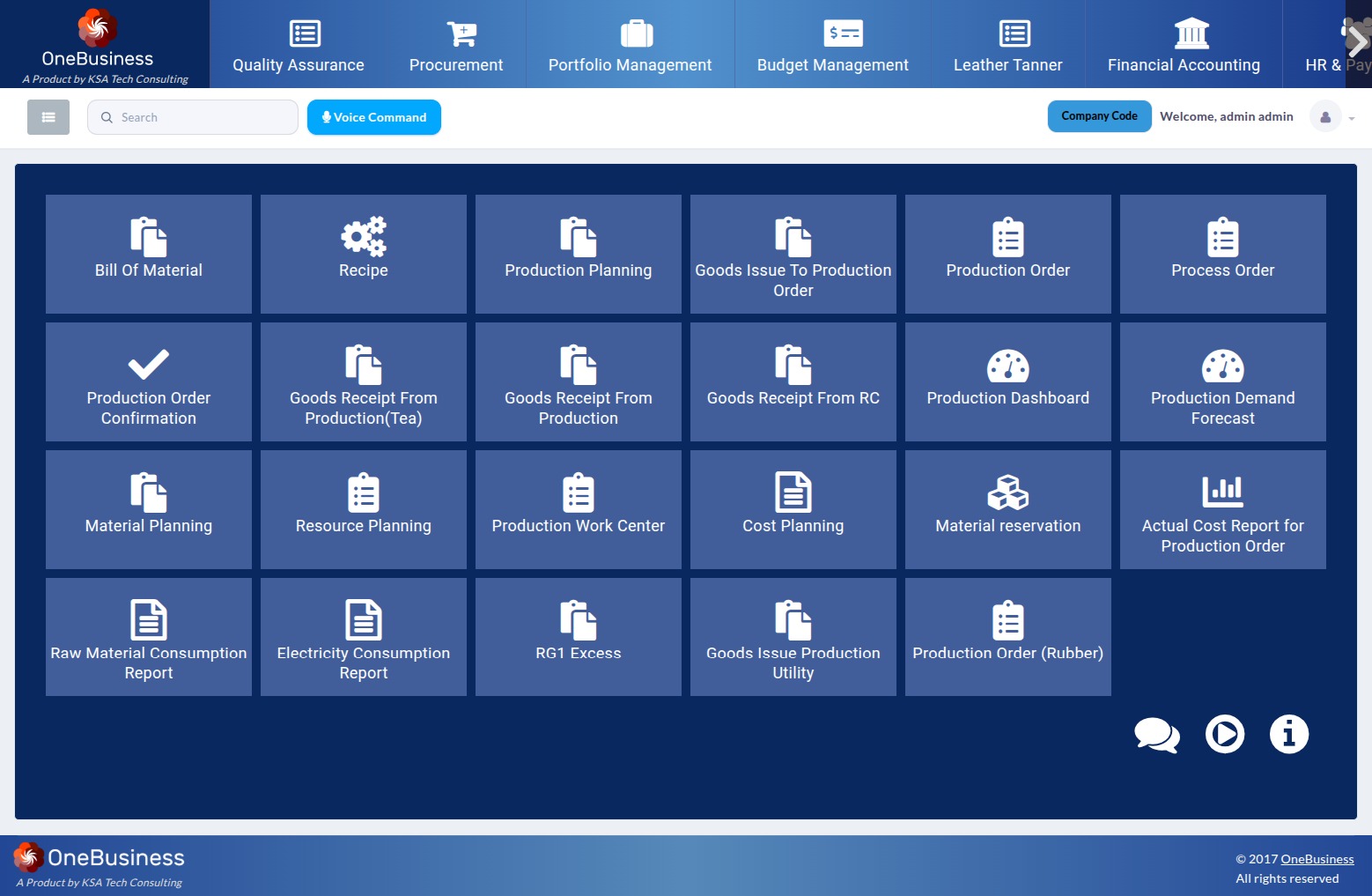
Our OneBusiness ERP Production Planning Module is designed to support both standard manufacturing operations and specialized production environments such as tea leaf factories, where production processes, material consumption, utilities, and batch-wise costing require additional control.
From Production Planning to Production Confirmation
The production process begins with production planning. The system uses the Bill of Materials (BOM) and Recipe to determine the materials, quantities, processes, and resources required to manufacture a finished product.
Based on the planned production quantity, the ERP can identify:
- Required raw materials
- Required quantities
- Production processes
- Production resources
- Work centers
- Utility requirements
- Expected production output
- Estimated production cost
Once the production plan is reviewed and successfully completed, the system can generate the corresponding Production Order.
End-to-End Production Flow
BOM & Recipe → Production Planning → Material Planning → Production Order → Goods Issue → Production Execution → Utility Consumption → Production Confirmation → Batch Costing → Production Reports
This integrated flow helps organizations maintain complete visibility from planning through final production.
Bill of Materials and Recipe-Based Planning
The Bill of Materials defines the materials required to manufacture a product, while the Recipe can define the production methodology, proportions, processes, and other manufacturing requirements.
Together, these provide the foundation for production planning.
For example, a production plan can determine that manufacturing a specific quantity of finished goods requires:
- Specific raw materials
- Defined quantities of each material
- Particular processing stages
- Specific machinery or work centers
- Defined utility consumption
- Required workforce
This reduces manual calculation and provides a standardized approach to production execution.
Specialized Production Planning for Tea Factories
Manufacturing requirements can vary significantly between industries. Tea processing, for example, involves specialized production stages and material flows that are different from conventional discrete manufacturing.
The ERP therefore supports specialized production planning for tea leaf factories, allowing organizations to plan and track production according to their specific manufacturing processes.
The system can help manage the planned production quantity, material requirements, production stages, resource requirements, utility consumption, and final production confirmation.
This enables tea manufacturers to maintain better control over the transformation of raw tea leaves through the production process while maintaining batch-level traceability and costing.
Material Planning and Goods Issue
Once a Production Order is created, the system determines the materials required for production through Material Planning.
The planned material requirements are used to initiate the Goods Issue to Production Order process.
This allows the organization to:
- Identify materials required for each production order
- Check material availability
- Reserve materials where required
- Issue raw materials to production
- Track actual material consumption
- Compare planned versus actual consumption
The result is better inventory control and greater visibility into production material usage.
Resource Planning and Work Center Management
Production does not depend only on materials. It also requires people, machines, work centers, and other production resources.
The Resource Planning functionality helps organizations identify and allocate the resources required for each production order.
The system can manage:
- Production resources
- Work centers
- Machines
- Employees
- Production capacity
- Resource allocation
- Employee assignment
Employees can be assigned to specific production orders or work centers, allowing organizations to track who is involved in a particular production activity.
This provides better control over workforce utilization and production capacity.
Utility Planning and Consumption
Utilities such as electricity, water, steam, fuel, or other production utilities can represent a significant portion of manufacturing costs.
The production planning process can incorporate utility requirements for planned production. During execution, actual utility consumption can be captured against the production order.
This creates a connection between:
Planned Production → Planned Utility Requirement → Actual Consumption → Production Cost
Organizations can then analyze utility usage and identify areas where consumption can be optimized.
Production Confirmation
After the manufacturing activities are completed, the Production Order Confirmation records the actual production results.
Production confirmation can capture information such as:
- Actual production quantity
- Production batch
- Material consumption
- Production activities
- Resource utilization
- Utility consumption
- Production variances
- Other production-related costs
This ensures that the ERP reflects what actually happened on the production floor rather than only what was originally planned.
Batch-Wise Production Costing
One of the key benefits of an integrated production planning system is the ability to calculate the actual production cost.
The system can accumulate costs associated with a production batch, including:
Raw Material Cost + Labour/Resource Cost + Utility Cost + Other Production Costs = Total Production Cost
This enables organizations to determine:
- Total production cost
- Cost per batch
- Cost per unit
- Material cost
- Utility cost
- Resource/labour cost
- Planned versus actual cost
Batch-wise costing provides management with better insight into production profitability and operational efficiency.
Cost Planning for Production Orders
Before production begins, organizations can establish a Cost Plan for each Production Order.
The planned cost can include expected:
- Raw material costs
- Labour costs
- Resource costs
- Utility costs
- Other manufacturing expenses
Once production is completed, the planned cost can be compared with the actual production cost.
Production Monitoring and Reporting
An ERP production system should not stop at transaction processing. It should also provide meaningful information for operational and management decision-making.
The Production Planning Module provides reports such as:
Raw Material Consumption Report
Provides visibility into the materials consumed during production and helps compare planned consumption against actual consumption.
Electricity Consumption Report
Tracks electricity usage associated with production and supports analysis of energy consumption and production efficiency.
Actual Cost Report for Production Orders
Provides a detailed view of the actual cost incurred for individual production orders.
Production Dashboard
Provides an overall view of production activities, helping management monitor production orders, planned quantities, actual output, costs, and other key production indicators.
A Connected Production Ecosystem
The real value of the Production Planning Module comes from connecting multiple manufacturing functions into a single process.
Instead of managing production planning, inventory issues, workforce allocation, utility consumption, costing, and reporting separately, the ERP creates a connected workflow:
Bill of Materials & Recipe
↓
Production Planning
↓
Material Planning
↓
Resource Planning & Work Center Allocation
↓
Production Order Creation
↓
Material Reservation / Goods Issue
↓
Production Execution
↓
Utility Consumption
↓
Production Confirmation
↓
Actual Batch Cost Calculation
↓
Production & Cost Reports
This integrated approach gives manufacturers better control, traceability, cost visibility, and operational efficiency across the entire production lifecycle.